Review & edit references
When you export references from databases into your EndNote library or enter references manually, you should always check each reference record carefully and edit any incorrect fields to ensure all references are displayed in a correct output style.
- Highlight one of the newly entered or imported references in the centre panel.
- Select the Summary tab and check the preview of the reference, which shows how it will appear in your reference list.

Review each reference:
- Add any missing information, such as publication details.
- Delete unecessary information that is displayed in the reference preview, such as [Article] at the end of an article title.
- Check author names are displaying correctly (for a corporate or group author, add a single comma at the end of the organisation name)
- Change capitalisation to meet your reference style standards.
- Correct any spelling mistakes.
Add extra details
EndNote templates contain a lot of unused fields which can be used to add additional information for a specific task or purpose.
- Added details can be searched by the EndNote search function.
- You can add as much or as little data as you like.
- Be consistent in what you enter, to ensure searches find all relevant references.
Examples of commonly used fields are listed below.
Keywords

- Use this field to highlight important concepts (single words or phrases) in the reference.
- The database the record came from may prefill this field, or you can create entirely new ones.
- You may create your own list of keywords for categorising the references in your Library.
- Keywords and phrases can be entered on separate lines, or separated by a semi-colon or backslash.
Notes and Research Notes
You can use the Notes or Research Notes fields to add information for each reference. As both fields are very similar, it is important to decide which type of information will be recorded in each field.
Consistency is key. Use the same field for the same type of information, and use the exact same words each time.

Examples of notes you could add to your references:
- Filing number or location of a hard copy document
- Thesis chapter or project the reference relates to
- A reminder, such as Request by Interloan
- Your reason for importing the reference, such as Cited in Smithers, or Recommended by Bloggs
- A direct quotation you intend to use (including the exact page number/s)
Edit multiple references
With EndNote you can edit multiple references at the same time. For example, you might want to add information to the notes or keywords fields of several references.
The following example shows how to add some identical text to multiple references:
- Create a group containing the references to add text to.
- With the group selected, select Library > Change/Move/Copy Fields.
- Select the Change Fields tab and Research Notes from the dropdown list.
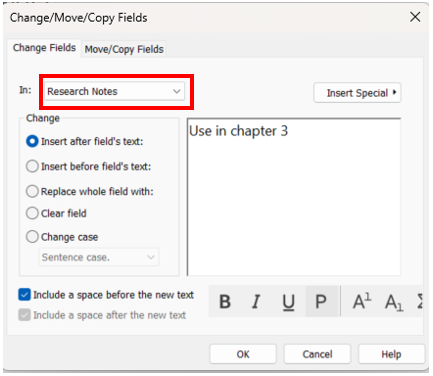
- Select Insert after field’s text and enter your note in the box on the right.
- Click OK to confirm the changes.
Note: Be careful using Replace whole field with. Using this option will delete any existing text in the selected field in all selected references.
Update references
If you have incomplete references in your EndNote Library, for example articles without DOI numbers, you can use Find reference updates to add any available information.
- Select the references requiring an update.
- Go to References > Find Reference Updates.

- A pop-up box will appear that compares the located record in the Available Updates column and the record in My Reference of your EndNote library.

- Select Update Empty Fields to add additional information to each reference.
- Click Save and Continue.
- If you don't want to update a suggested field, click the Skip button.